 Pinellas County, FL
Clack WS1 manual & owner's quick guide
Got a Clack WS1? This is the 10-minute version — the part of the manual you'll actually use, in plain English. The full factory books are linked at the bottom for free. I'm Matt, I install these around Clearwater, Largo, and St. Pete, and if yours came from me, this page is your book now.
1. The bypass — learn this one first
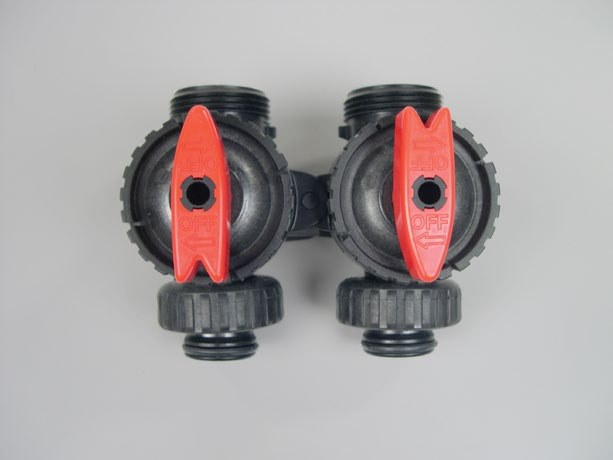
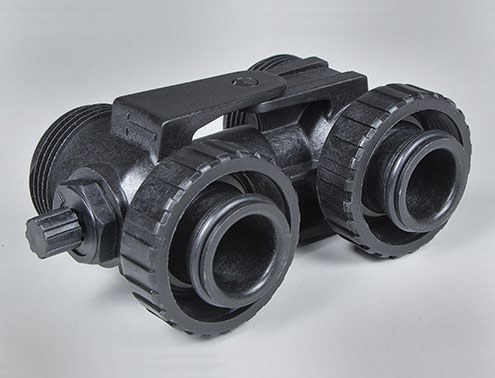
On the back of the valve, where the pipes connect, there's a block with two red arrow handles. That's the bypass (Clack part V3006, if you're ever ordering one). The arrows aren't decoration — each arrow points the way the water is flowing.
- Service (normal): inlet arrow points into the valve, outlet arrow points out to the house. Water goes through the softener.
- Bypass: turn both handles a quarter turn until the arrow tips point at each other, into the center. The softener is cut off; the house gets hard water and the unit can't flood anything.
Leaking? Running nonstop? Bypass it first, then think. The full emergency walk-through is here. Stiff handles are normal on a valve nobody's touched in years — open a faucet to drop the pressure, and never force one with a wrench.
Watch the Clack WS1 bypass animation — tap SERVICE / BYPASS and watch the arrows turn
2. The clock — after a power outage
The WS1 keeps time on battery for a while after an outage. If the display is flashing the time, it lost track — and a softener with the wrong clock cleans itself in the middle of your morning shower instead of at 2 a.m.
- Press SET CLOCK.
- Set the hour with the ▲ / ▼ arrows (watch the AM/PM), press NEXT.
- Set the minutes, press NEXT. Done.
While you're there, glance at the regeneration time — it should say 2:00 a.m., or whenever nobody in your house uses water.
3. Start a regeneration by hand
Want it to clean itself right now — say, the water's gone hard the day before company arrives?
- Tonight: press and release REGEN. You'll see “REGEN TODAY” flash; it runs at the normal regeneration time.
- Right now: press and hold REGEN for three seconds. It starts immediately and can't be cancelled — make sure that's what you want.
- No salt in the tank? Fill it and wait at least two hours before regenerating, per the manual.
4. The hardness setting — know your number, then leave it
The hardness number tells the valve how hard your water is, and the valve does the math on how often to clean itself. Yours was set from your actual water test at install — Clearwater city water runs about 14 grains, and wells run all over the map. Your number is written on the settings card at your unit.
- A couple of grains either way is the safe band I teach at install. Inside the band, the unit just uses a little more or less salt.
- Way high burns salt for nothing. Way low and your water quietly goes hard.
- Moved, changed water sources, or not sure? Call me before you go digging in the settings menus — the deep settings (capacity, salt dose) are installer territory, and one wrong number undoes the rest. (727) 342-0091.
5. Salt — boring, and it runs the whole show
- Use softener salt pellets. Keep the tank covered.
- Check it about once a month. You want salt sitting above the water line in the tank.
- Salt look full but the water's hard? Poke it with a broom handle. If it's a hollow crust — a salt bridge — the tank has been fooling you. That's a known thing in humid Florida garages, not a broken softener.
What's NOT in this guide, on purpose — with one exception
Pistons, seal packs, board programming — the inside of the valve is not in this quick guide. Not because it's secret: because a wrong turn in there costs you a valve, and the book itself (below) is written for the dealer.
The one exception, on my installs: hands-on Clack owners get the advanced seal cage lesson free, in person, the day I install it — taught at your unit, not guessed from a web page. If your WS1 needs more than the five things above and you weren't taught it in person, that's a service call, and it's cheaper this week than next month.
The full official manuals (free PDFs)
- WS1 & WS1.25 Drawings and Service Manual — everything, including the bypass valve section (48 pages, Clack Corporation)
- WS1 & WS1.25 Operation and Instruction Manual (CS board version, on Clack's own site) — programming and displays (20 pages)
- Clack Quick Guide, form V3115-01 — Clack's one-page sheet: bypass diagram, clock, hardness (1 page). Staged note: no verified direct link was in the source file at assembly time, so none is printed rather than a guessed one.
One honest note: Clack writes these books for installers, not owners — the front page literally says so. That's not a knock on the valve; it's why this page exists.
Back to the manuals library · Emergency & bypass help · Lessons
On my install — or not
On my install and lost your settings card? Call or text (727) 342-0091 — your settings are on file with me. Not my install and want this taught at your unit, hands-on? That's the Know Your System house call, covered on the emergency page.
Aqua Pro Services · Licensed & Insured · (727) 342-0091
Print & save this guide
This page, as a clean printable file — for the fridge, the garage, or the next person who touches the unit.